
Making the move from Citrix to AVD
Moving from Citrix to AVD isn’t just a “lift-and-shift”—it’s a chance to simplify your architecture, optimize costs, and modernize how users access apps. The trick is doing the groundwork properly which requires comprehensive planning and attention to key pre-reqs so you don’t recreate old problems in a new platform.
The principles for deploying and managing AVD are very similar to Citrix (and indeed Horizon) but for as many similarities, there are just as many differences: image management, user access, policies to name a few.
This article aims to guide you through the planning process, highlighting what to expect and offering practical advice to help set you on the right path as you embark on your transition. This is by no means a complete how to on migrating from Citrix to AVD but it should hopefully steer you in the right direction and get you started.
Start with a Reality Check (Assessment & Discovery)
Before touching Azure, get a clear picture of your current Citrix environment. You need to know what you’ve got and how you use it in order to plan the move properly. Don’t forget to consider the business drivers for the move as well.
· Why are you moving?
· What are the business requirements for AVD?
· Have the user access requirements been considered?
· Does the environment need better integration with Azure resources?
Key things to inventory:
· Active users vs. total users
· Peak concurrent sessions (this matters more than total users)
· Application usage patterns
· CPU, RAM, and IOPS usage per session
· Login storms / peak hours
· Profile sizes and logon times
If your Citrix environment is oversized (very common), don’t blindly replicate it—AVD often runs leaner.
Architecture Shift: Citrix vs AVD Mindset
Citrix environments include the following components. In many cases, multiple instances of each for redundancy and resiliency.
· Delivery Controllers
· StoreFront
· NetScaler
· Citrix Licencing servers
· Database servers
With AVD, Microsoft handles the control plane:
· No brokers to manage
· No gateway appliances
· Native integration with Entra ID
Your focus shifts to:
· Session hosts (VMs)
· Storage (profiles, FSLogix)
· Networking
· Scaling logic
Cost Drivers in AVD
· VM compute (biggest cost)
· Storage (profiles)
· Networking (egress)
· Azure Files / NetApp
Scaling plans are your main cost control lever.
Identity and Authentication
When transitioning from Citrix to AVD, it’s crucial to re-evaluate your approach to user identity and authentication. Unlike traditional Citrix, AVD leverages native integration with Entra ID, which streamlines access management and enhances security. This shift means organisations must ensure their identity infrastructure is robust and compatible with cloud-based authentication mechanisms. Additionally, enabling Single Sign-On (SSO) in AVD requires certain prerequisites:
· Review existing user accounts and groups to ensure seamless migration to Entra ID.
· Implement Conditional Access policies to bolster security for remote access.
o Assess conditional access policies to control access based on user location, device compliance, and risk level.
· Plan for user provisioning and de-provisioning workflows in the new environment.
· Ensure compliance with data protection and privacy regulations during identity migration.
SSO Prerequisites:
o Devices must be Entra joined or hybrid joined to support SSO for AVD.
o Ensure users sign in with their Entra ID credentials.
o Deploy the latest supported version of the Windows App client that supports SSO.
Licencing for Azure Virtual Desktop
Licencing is a pivotal aspect of the migration. Review your current Citrix and Microsoft Licencing agreements to identify any gaps or opportunities for consolidation. AVD requires eligible Windows or Microsoft 365 licences for each user; confirm that you have the appropriate licences in place and budget for any additional needs. It’s advisable to engage with your Microsoft Licencing partner early in the process to ensure compliance and cost optimisation
Licencing Considerations
AVD simplifies Licencing compared to Citrix.
What you need:
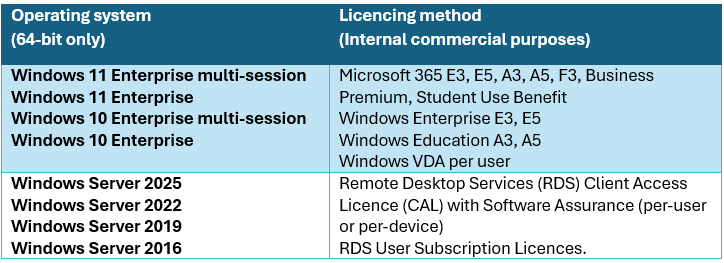
Licencing Azure Virtual Desktop - Azure Virtual Desktop | Microsoft Learn

User Density: Concurrent, Maximum and Minimum Users
Understanding your user density is crucial for a smooth transition. Identify the number of concurrent users typically active in your Citrix environment, as well as the maximum and minimum users expected at any given time. This data informs both the sizing of your AVD environment and your scaling policies, ensuring that you can accommodate peak loads without over-provisioning resources.
Remember to take into account the required access to the backend storage account where the FSLogix profiles will be stored and securing access to that.
User Density (Concurrent vs Maximum Users)
This is a critical distinction.
Definitions:
· Concurrent users = users logged in at the same time
· Total users = Licenced or assigned users
You size infrastructure based on concurrent users, not total users.
Example
If you have:
· 1,000 total users
· 70% concurrency
Plan for 700 concurrent sessions
Density Planning Formula
Total VMs = Concurrent Users ÷ Users per VM
Example:
700 users ÷ 25 users per VM = 28 VMs
Add:
+10–20% buffer capacity
User Profiles (FSLogix is Mandatory)
AVD relies heavily on FSLogix Profile Containers.
Best practices:
· Store profiles on:
o Azure Files (Premium) OR
o Azure NetApp Files (for large environments)
· Use Cloud Cache for resilience
o There is a small logon hit when using Cloud Cache as well as the storage requirements and costs to consider.
o Think carefully whether you actually need to replicate user profiles. If there’s nothing in them that is required for users or apps and they can be easily recreated with no issues then Cloud Cache isn’t needed.
Cloud Cache Overview - FSLogix | Microsoft Learn
· Keep profiles under control:
o Redirect temp/cache folders
Monitor profile growth
Configuration Examples - FSLogix | Microsoft Learn
Planning for Session Host Sizes and Capacity
One of the primary prerequisites is to assess and plan the size and capacity of your AVD session hosts. Begin by analysing your current Citrix environment to determine the virtual machine specifications in use—such as CPU, memory, and storage requirements. This baseline will guide your selection of appropriate VM sizes in Azure, ensuring optimal performance and cost-effectiveness. Consider peak and average usage patterns to right-size your AVD session hosts for both current and projected workloads.
Session Host Sizing (The Core of Everything)
This is where most migrations succeed or fail.
Recommended VM Sizing Approach
Instead of guessing, use this baseline:
For multi-session workloads:

How to Size Properly
1. Start with CPU:
- Average: 1 vCPU per 2–4 users
- Heavy apps: 1 vCPU per 1–2 users
2. Memory:
- Baseline: 1.5–2.5 GB per user
- Add overhead for apps (Teams, browsers, etc.)
3. Disk / IOPS:
- Use Premium SSD
- FSLogix profiles can spike IOPS during logins
Golden Rule:
Always pilot and measure.
Start conservative during testing, then increase density. Never skimp on the testing phase.
Session Host Virtual Machine Sizing Guidelines for Remote Desktop | Microsoft Learn
Application Usage and Backend Access
Catalogue all applications currently delivered through Citrix, noting their resource demands and backend dependencies. Determine whether these applications require access to databases, web servers, or application servers, and evaluate the connectivity and latency requirements for each. Ensure that backend resources are accessible from the Azure environment and consider network bandwidth and security when planning your migration.
Application Strategy (Don’t Just Reinstall Everything)
Citrix environments often accumulate years of “app sprawl.”
Clean up before migrating:
· Remove unused apps
· Consolidate versions
· Separate incompatible apps
App Delivery Options in AVD
Image-based installs (most common)
· Apps baked into a golden image
· Best for stable, widely used apps
App Attach
· Apps delivered dynamically
· Great for:
o Reducing image sprawl
o Testing app versions
· Requires packaging effort
RemoteApp
· Publish individual apps instead of desktops
· Good replacement for Citrix seamless apps
Important Considerations
· Teams optimization: Use AVD-optimized version
· FSLogix: Required for profile containers
· App layering tools: Not native like Citrix App Layering—plan accordingly
· Networking: plan for the access to backend DB or file servers
Scaling Plans
Developing robust scaling plans is essential. AVD allows you to scale session hosts up or down based on demand, helping to optimise costs while maintaining user experience. Implement auto-scaling rules that reflect your organisation’s working hours, projected growth, and seasonal fluctuations. Test these scaling strategies prior to migration to avoid resource shortages or unnecessary overspending.
Scaling Plans (Cost vs Performance Balance)
This is where AVD can shine compared to Citrix.
Two Scaling Approaches
1. Depth-first
- Fill up one VM before starting another
- Maximizes cost efficiency
2. Breadth-first
- Spread users across VMs
- Better performance, higher cost
Native AVD Scaling Plans
You can:
· Auto-start VMs at peak hours
· Shut down during off-hours
· Scale based on:
o Session count
o Time schedules
Key Settings
- Ramp-up period: Start VMs before login peak
- Peak hours: Maintain full capacity
- Ramp-down: Drain sessions before shutdown
Migration planning
Migration Strategy (Don’t Big-Bang This)
The actual user migration over to AVD should be a planned and phased approach and should include extensive testing before fully moving over. Ensure that you have a full test plan and include test users from all the different departments that will be using it. Don’t rely on a handful of users and NEVER leave the testing to just the IT department. You need to ensure that users who will be accessing AVD daily and know how to use and test the apps are part of the testing.
Recommended approach:
Phase 1: Pilot
· 20–50 users
· Validate:
o Performance
o App compatibility
· Profile behaviour
Phase 2: Expand
· Migrate departments in waves
· Optimize density and sizing
Phase 3: Optimize
· Tune scaling
· Reduce VM sizes if possible
· Introduce App Attach if required
Common Pitfalls (Seen in Real Migrations)
· Copying Citrix sizing assumptions directly
· Ignoring login storms
· Oversized gold images
· Not testing Teams/media workloads
· Underestimating profile IOPS
· No scaling plan → runaway costs
· Small or no testing phase
· Only using the IT department to test before migrating users
Conclusion
Successfully migrating from Citrix to AVD hinges on thorough preparation. By carefully considering session host sizing, scaling strategies, user density, application requirements, backend access, and Licencing, organisations can reduce risk and streamline the transition. Early and detailed planning lays the foundation for a resilient and efficient AVD deployment.
Final Takeaways
If you boil it down:
· Size for concurrency, not total users
· Start small, measure, then increase density
· Use FSLogix properly—this is non-negotiable
· Leverage scaling plans to control cost
· Clean up apps before migrating (seriously, do it)