
Identity and Authentication for AVD
Identity is now an architecture decision, not just an AD decision
Historically, many virtual desktop designs started with a simple assumption:
“We need domain-joined session hosts because that’s how desktops have always worked.”
That’s no longer always true.
AVD now supports a much broader set of identity patterns, including Entra joined session hosts and cloud-only identities. Microsoft states that Entra joined AVD session hosts can remove the need for line-of-sight to an on-premises or virtualised domain controller, and in some cases can remove the need for a domain controller entirely.
That changes the design conversation. The question is no longer simply: “Where are the domain controllers?”
It becomes:
“Which identity model does the user, the session host, and every backend service actually require?”
That distinction matters. AVD authentication isn’t a single event. There are three authentication phases for AVD:
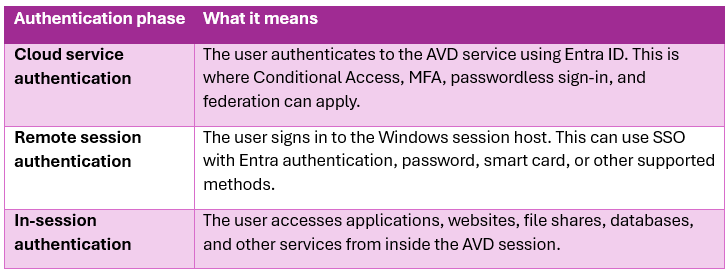
AVD identity guidance explicitly separates these three stages because each one can have different authentication requirements.
The main identity options for AVD
Entra ID only
This is the modern cloud-first model.
In this design, users are created and managed directly in Entra ID, and the AVD session hosts are Entra joined. Microsoft confirms that AVD supports cloud-only identities when using Entra joined VMs.
This approach is well suited to:
- New cloud-first organisations
- Environments with no dependency on traditional AD DS
- Contractors, task workers, or isolated user groups
- Greenfield AVD deployments
- Environments managed through Intune rather than Group Policy
- Workloads based mainly on Microsoft 365, SaaS, web apps, and modern authentication
The biggest benefit is simplification. There is no requirement to deploy domain controllers just to allow users to sign in to AVD session hosts. Session hosts can also be automatically enrolled into Intune, which makes policy and configuration management cleaner for cloud-first environments.
This doesn’t mean “no identity design required.” You still need to plan:
- Conditional Access
- MFA and sign-in frequency
- Device compliance requirements
- User assignment to application group
- RBAC for administration
- Profile storage
- Backend application authentication
- Access to Azure Files, databases, line-of-business applications, and legacy services
The important design point is this: Entra ID only is viable where the desktop and backend services can also operate without traditional AD DS dependencies.
Hybrid identity with Active Directory Domain Services
This is still common, especially in organisations with existing on-premises services.
In this model, user accounts exist in AD DS and are synchronised to Entra ID using Entra Connect or Cloud Sync.
This model is often the right choice when users need access to:
- Existing on-premises file shares
- Legacy applications using Kerberos or NTLM
- SQL servers using Windows authentication
- LDAP-dependent application
- Existing Group Policy-based controls
- Certificate-based or smart-card scenarios
- Applications that expect a traditional domain identity
Hybrid identity doesn’t mean every session host must be AD DS joined. AVD supports scenarios where hybrid identities are used with Entra joined session hosts.
That distinction is useful. You may be able to modernise the session host join model while still supporting users who originate from AD DS.
However, where session hosts are AD DS joined, the network design must support connectivity to domain controllers and DNS. AVD prerequisites require that if AD DS or Entra Domain Services is used, the virtual network must be able to connect to the relevant domain controllers and DNS servers.
Entra Domain Services
Entra DS sits between traditional AD DS and full cloud-native identity.
It provides managed domain services such as domain join, Group Policy, LDAP, and Kerberos/NTLM authentication without requiring you to deploy, manage, and patch your own domain controllers.
This can be useful where:
- Applications still need LDAP, Kerberos, NTLM, or domain join
- The organisation doesn’t want to run its own domain controllers in Azure
- The workload is mostly Azure-based
- A managed domain is acceptable
- There is no requirement for full traditional AD DS administration
It isn’t a magic “replace AD in every scenario” button. It has design implications around networking, DNS, synchronisation, OU structure, Group Policy, and application compatibility. But for some AVD designs, especially those supporting older applications in Azure, it can reduce operational overhead compared to self-managed DCs.
Now my personal experience with Entra DS hasn’t been overly positive and the restrictions around GPO’s and OU configuration played havoc with how I’m used to setting up AD (I’ve been creating domains and AD since Server 2003!). I’ve included it for completeness but I’m not overly a fan of Entra DS. Now remember this is my opinion and it may be just the ticket for others so my advice is to use what works for you and the organisation.
Federated identity and third-party identity providers
Some organisations use third-party identity providers. Microsoft supports this pattern as long as the third-party IdP is federated with Entra ID, the session hosts are Entra joined or hybrid joined, and Entra authentication is enabled to the session host.
This is an important point: even when another identity provider is involved, Entra ID still remains central to the AVD authentication flow.
External Identity
Microsoft has added support for Microsoft Entra external identities in AVD, which means you can invite users from another tenant, for example contractors, partners, suppliers, or users from a customer organisation, and grant them access to AVD resources using their guest/B2B identity rather than creating a separate “local” user account for them in your tenant.
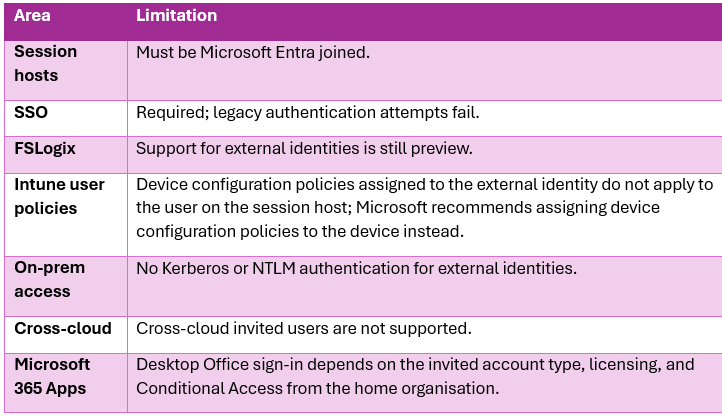
This has only recently come out of preview but there are still some restrictions to setting it. I’ve included the below link which detail the requirements and limitations but I’ve included some of the main ones below.
Key requirements
- To use external identities with AVD, the session hosts must be Entra joined, not traditional AD DS joined
- The host pool must also have single sign-on configured
- The supported session host operating systems are currently Windows 11 Enterprise 24H2 or later with the required cumulative update, or Windows Server 2025 with the required cumulative update
- Windows App on Windows or web browser is supported
- Currently in preview on Mac and Android versions
Limitations to watch
Single sign-on should be the default design goal
A poor AVD sign-in experience is one of the quickest ways to lose user confidence. Without SSO, users may be prompted for credentials when connecting to the session host.
SSO is only supported for Entra joined or Entra hybrid joined session hosts. Entra DS or AD DS joined session hosts aren’t supported.
SSO isn’t just about convenience. It also helps create a cleaner security model. It’s one of the big differences for organisations making the move from Citrix to AVD and can be a little bit of a culture shock when you first start using AVD.
It allows organisations to build authentication around:
- Conditional Access
- MFA
- Passwordless authentication
- Device state
- Sign-in risk
- Location
- Session control
- Third-party federation
For most modern AVD deployments, the design principle should be:
Use Entra ID SSO wherever supported, then design exceptions only where legacy requirements force them.
I’ve included the below link that gives all the pre-reqs and requirements for setting up SSO.
Conditional Access and MFA
Because AVD can be accessed from many locations and devices, Conditional Access should be part of the core design rather than something added at the end.
Conditional Access for AVD policies can be scoped to different AVD clients, including web, mobile, desktop clients, or all clients.
Useful Conditional Access considerations include:
- Require MFA for AVD access
- Require phishing-resistant MFA for privileged users
- Require compliant or hybrid joined devices for admin access
- Apply stricter controls for unmanaged devices
- Use sign-in frequency policies for personal or shared devices
- Block access from high-risk locations
- Exclude break-glass accounts from standard policies
- Test policies before enforcing them broadly
For AVD, this is especially powerful because the desktop may become the controlled access point into sensitive applications and data.
Authenticating to backend services
This is where many AVD designs either succeed or quietly turn into a bowl of spaghetti.
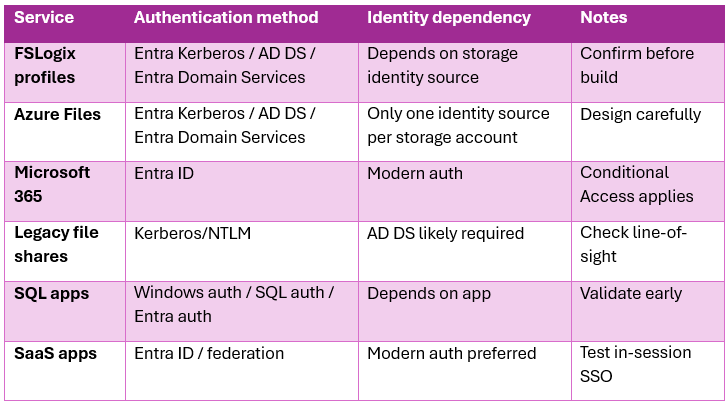
It isn’t enough to decide how the user signs in to AVD. You also need to decide how the session authenticates to everything behind it.
Backend services to assess
During design, review how users will authenticate to:
- FSLogix profile storage
- Azure Files
- On-premises file shares
- SQL database
- Line-of-business applications
- SaaS applications
- Microsoft 365
- Print services
- Certificate services
- Legacy web applications
- Admin tools
- Developer platforms
- Privileged access systems
For each service, ask:
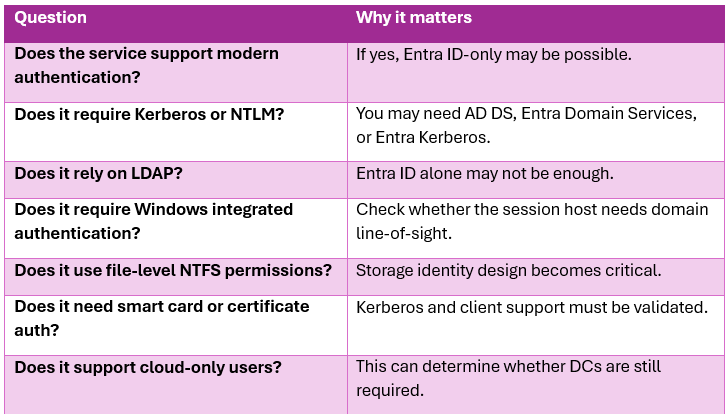
The backend authentication model should drive the final identity decision.
Azure Files, FSLogix, and Entra Kerberos
One of the most significant changes in modern Azure Virtual Desktop design is the growing ability to build AVD around cloud-only Microsoft Entra ID identities, rather than assuming that every deployment needs Active Directory Domain Services, hybrid identity, or Microsoft Entra Domain Services.
Traditionally, many AVD designs were built around a familiar pattern: session hosts were domain joined or hybrid joined, users were synced from Active Directory into Microsoft Entra ID, and FSLogix profile containers were stored on Azure Files using AD DS-based authentication. That model still works, and it is still valid for many environments, especially where users and applications remain heavily dependent on traditional Kerberos, NTLM, Group Policy, legacy file shares, or domain-joined backend services.
However, the newer cloud-only model changes the conversation.
Microsoft now supports cloud-only identities in AVD when using Entra joined session hosts. These users are created and managed directly in Microsoft Entra ID, and the same identity is used to authenticate to the AVD service and sign in to the session host. Microsoft also recommends using single sign-on with Microsoft Entra authentication so the user experience is consistent and Conditional Access can be applied properly.
For AVD, this is a big deal.
It means a modern AVD design can potentially use:
- Entra joined session hosts
- Cloud-only users
- FSLogix profiles on Azure Files
- Entra Kerberos
- No customer-managed AD DS domain controllers
There are still important caveats. A storage account can only use one identity source for Azure Files identity-based authentication: Entra Kerberos, AD DS, or Entra Domain Services. Also, Entra Kerberos for Azure Files doesn’t support MFA during file share access, so Conditional Access policies requiring MFA must exclude the storage account application to avoid authentication failures.
That means this area needs careful design, not guesswork.
When Entra ID only can remove the need for domain controllers
An Entra ID-only AVD design can remove the need for domain controllers when the following are true:
- Users are cloud-only or can operate without traditional AD DS sign-in
- Session hosts are Entra joined
- Device management can be handled through Intune
- Applications support modern authentication or do not require AD DS
- FSLogix profile storage can use Azure Files with Entra Kerberos
- File access doesn’t depend on legacy domain-only ACL models
- There are no applications requiring LDAP, NTLM, classic Kerberos to AD DS, or Group Policy
- Admin processes can use Entra ID, Azure RBAC, PIM, and Intune
This is ideal for greenfield, modern, SaaS-heavy, or isolated AVD deployments.
However, if the environment still relies heavily on legacy applications, traditional file shares, domain-based SQL authentication, LDAP queries, or GPO-driven management, then removing AD DS too early can create more problems than it solves.
The sensible approach isn’t “cloud-only at all costs.”
The sensible approach is:
Use Entra ID-only where the workload supports it. Use hybrid identity where the business still depends on hybrid services. Avoid deploying domain controllers purely out of habit.
Decision guide: choosing the right identity model
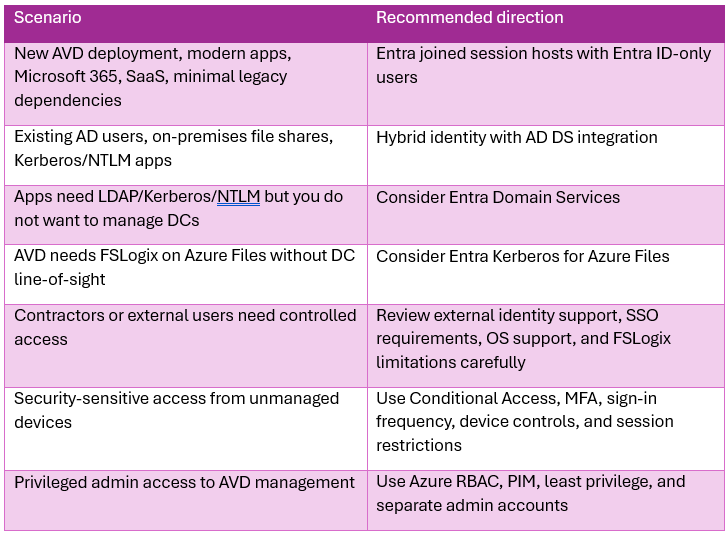
I’ve included the link to the Microsoft docs below and there are numerous videos on You Tube about the actual setup and how to configure it which are well worth a watch.
Store FSLogix profile containers on Azure Files using Microsoft Entra ID - FSLogix | Microsoft Learn
Practical design outputs
At the end of the identity and authentication design phase, you should have clear documented outputs.
1. Identity model decision
Document whether the environment will use:
- Entra ID only
- Hybrid identity with AD DS
- Entra Domain Services
- Federated identity
- A combination based on user personas or host pools
2. Session host join model
Define whether session hosts will be:
- Entra joined
- AD DS joined.
- Entra hybrid joined.
- Entra Domain Services joined.
3. Authentication flow
Map the user journey:
- User authenticates to AVD
- Conditional Access applies
- User connects to the host pool
- SSO signs the user into Windows
- The user accesses apps and data
- Backend services authenticate the user
4. Backend service authentication map
Create a simple matrix showing:
5. Conditional Access design
Include:
- AVD user policy
- Admin policy
- MFA requirements
- Sign-in frequency
- Device compliance rules
- Named locations
- Exclusions
- Break-glass accounts
- Testing and rollout approach
6. Administration model
Using Azure RBAC to separate duties across teams managing AVD has always been recommended. This should include AVD-specific roles, supporting Azure roles for VMs and networking, and security groups aligned to operational responsibilities.
Real-world example
A customer is migrating from Citrix to AVD. They currently have:
- AD DS on-premises
- Microsoft 365
- Legacy finance application using Windows authentication
- Departmental file shares
- SQL databases using integrated authentication
- FSLogix requirement
- Remote users on managed and unmanaged devices
The tempting option is to lift everything into Azure and domain join all session hosts. That may work, but it could also carry forward unnecessary complexity.
A better approach is to split the design:
- Use Entra ID for cloud service authentication
- Use Conditional Access and MFA for AVD access
- Use SSO for the session host experience
- Keep hybrid identity for users who need legacy apps and file share
- Consider Entra joined session hosts where possible
- Use Entra Kerberos for Azure Files if FSLogix can be supported without direct DC dependency
- Retain AD DS connectivity only where backend applications genuinely require it
- Use Intune for session host configuration where possible instead of relying entirely on Group Policy
This gives the organisation a migration path rather than a simple copy of the old model. The goal isn’t to remove AD DS on day one. The goal is to stop AD DS being the default answer for every requirement.
…and Finally
Identity is one of the most important design decisions in AVD.
It affects security, user experience, profile management, application access, operations, networking, and long-term modernisation. AVD now gives organisations more identity options than traditional VDI platforms did, especially with Entra joined session hosts, Entra SSO, Conditional Access, passwordless authentication, and Entra Kerberos for Azure Files.
The key is to design identity around the full access path:
Who is the user? How do they authenticate to AVD? How do they sign in to the session host? What do they need to access inside the session? Which backend services still require legacy identity?
Get those answers right, and AVD becomes more than a remote desktop platform. It becomes a secure, modern access layer for applications and data.
In the next article, we’ll go through application and profile strategy and I’ll try to make it a bit shorter than this tome!