
Designing the AVD Architecture: Laying the blueprints for a successful deployment
A good AVD architecture is designed by asking:
Who are the users? What do they need to access? Where is the data? How sensitive is the workload? How should users authenticate? What level of performance is expected? What happens if something fails? Who will manage and operate the platform after go-live?
The planning phase gives us the business direction.
The discovery phase gives us the technical and user detail.
The design phase turns both of those into an architecture that can actually support the organisation.
This is by no means an extensive how to for creating the design of an AVD architecture. This is only supposed to be the high level guidelines based on my experience with designing AVD deployments. Each of the sections below will be covered in more detail in future articles in the series, this instalment is to show what you should be considering when starting the design.
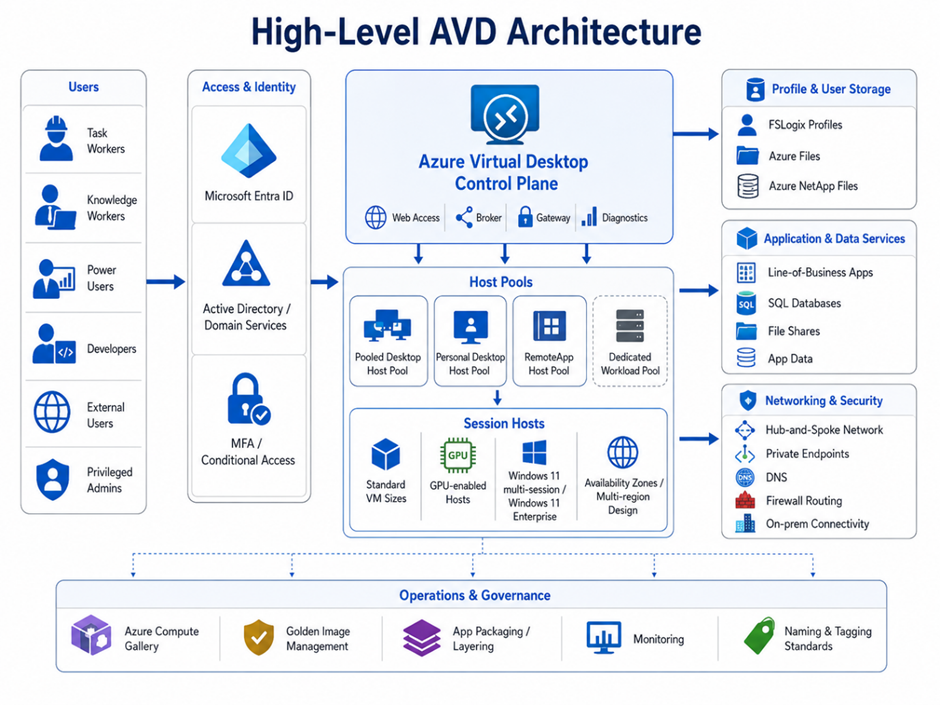
Start with the Host Pool Strategy
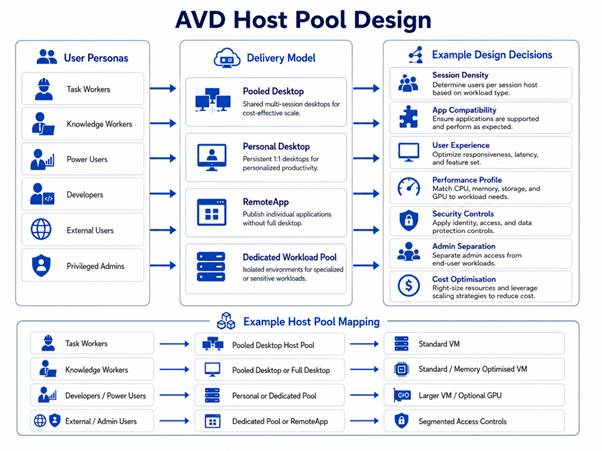
The host pool strategy is one of the most important design decisions in an AVD environment.
This decision affects cost, performance, user experience, security boundaries, image management, support processes, and scalability.
Not every user group should automatically land in the same host pool. Different users may have different performance needs, application requirements, security controls, and availability expectations.
Key decisions include:

This decision should be based on how users work, not just on what is easiest to deploy.
You may need separate host pools for:
- Task workers
- Knowledge workers
- Power users
- Developers
- GPU workloads
- Privileged administration
- Third-party or external users
- Application-specific workloads
This helps avoid one large, mixed environment where every design decision becomes a compromise.
Session Host Design
Session hosts are where user experience becomes very real.
A weak design here leads to slow logons, poor application performance, user complaints, and unnecessary Azure spend.
Session host design should consider:
VM Size
- Sizing should be based on user persona, application usage, concurrency, CPU, memory, disk performance, and expected session density
- A task worker running lightweight apps has very different requirements from a developer, CAD user, data analyst, or finance user running heavy line-of-business applications
Operating System Image
- The OS image should be standardised, secured, patched, and aligned to the application and user requirements
- The image should not become a dumping ground for every possible application. A bloated image creates longer update cycles, more testing complexity, and increased operational risk
GPU Requirements
- Some workloads need GPU-enabled session hosts, especially where users work with graphics-intensive applications, 3D tools, design software, video workloads, or specialist visualisation platforms
- This needs to be designed early because it affects VM selection, cost modelling, capacity planning, and user placement
Availability Zones and Region Design
- AVD architecture should consider resilience from the start
- A resilient AVD design isn’t just about keeping session hosts online. It's about making sure users can still authenticate, access profiles, reach applications, open files, print where required, and continue working during a failure scenario
- Microsoft provides session host sizing guidance, but sizing should always be validated against real workload behaviour rather than treated as a one-size-fits-all answer
Image Management
Image management is often underestimated in AVD projects.
A design that works on day one can become difficult to manage after three months if image updates, application changes, patching, testing, and rollback are not planned.
The gold image should be controlled, versioned, tested, and repeatable.
A strong image strategy should define:
Gold image approach
- It should include the base OS, required agents, security configuration, core applications, monitoring components, and standard configuration required for the user group
- Azure Compute Gallery
- Azure Compute Gallery can be used to manage, version, replicate, and distribute images across regions and environments
- This is especially useful where organisations need consistent image deployment across multiple host pools, subscriptions, or regions
Application packaging and layering
- Not every application needs to be baked into the image
- Some applications may be better delivered through application packaging, automation, Microsoft Intune, scripting, or other deployment tooling
- The design should define what belongs in the base image, what is layered on top, and what is deployed dynamically
This decision has a direct impact on update speed, testing effort, rollback options, and operational agility.
(I realise I've left out App Attach here, this will most definitely be covered in a future article!)

Networking Design
Networking is often where AVD designs become more complex than expected.
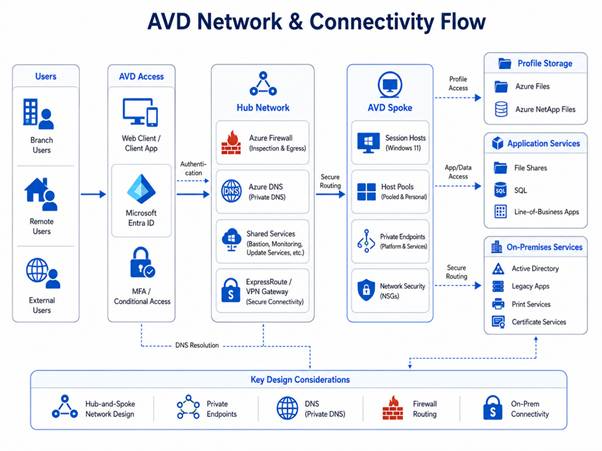
Users may connect to AVD from anywhere, but the session hosts still need secure and reliable access to identity services, file shares, application servers, databases, update services, monitoring tools, and sometimes on-premises systems.
Networking decisions should include:
Hub-and-spoke design
- In many enterprise environments, AVD will sit within a hub-and-spoke Azure network model
- The hub may provide shared services such as firewalls, DNS, connectivity to on-premises, monitoring, and security tooling
- The AVD spoke can then host session hosts, storage access, private endpoints, and workload-specific resources
Private endpoints where appropriate
- Private endpoints may be used for services such as storage accounts where private access is required
- This can improve security by reducing public exposure, but it also introduces DNS and routing considerations that must be designed properly
DNS
- DNS is critical
- Session hosts need to resolve Azure services, domain services, private endpoints, file shares, application servers, and on-premises systems
- A weak DNS design can break authentication, profile loading, application access, mapped drives, and backend connectivity
Firewall routing
- Traffic flows should be clearly understood
- Will internet-bound traffic route directly from Azure, through Azure Firewall, through a third-party NVA, or back through on-premises?
- Will session hosts need controlled access to update services, SaaS platforms, application endpoints, monitoring platforms, and identity services?
- These decisions affect security, performance, cost, and troubleshooting
Access to on-premises services
- Many AVD deployments still depend on on-premises systems
- This may include file shares, Active Directory, SQL databases, certificate services, legacy applications, print servers, licensing servers, or line-of-business platforms
- The architecture must define how AVD session hosts securely and reliably reach these services
This is why the network design must be based on the discovery outputs, not assumptions.
Storage & FSLogix Design
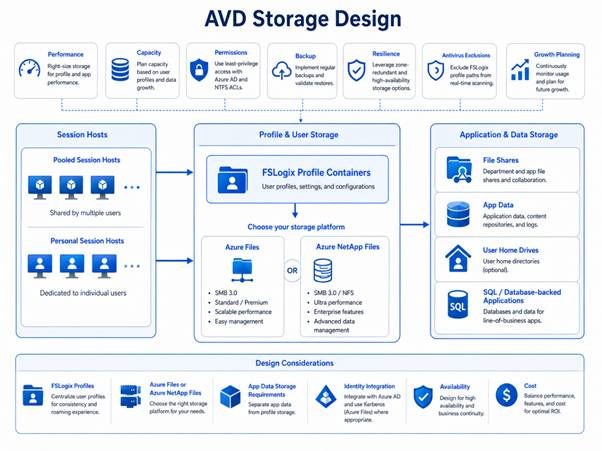
Storage is one of the most important parts of the AVD user experience.
If profile storage is slow, unavailable, or incorrectly configured, users will feel it immediately.
FSLogix profile design is one of the most important user experience decisions in AVD.
In pooled host pools, users may connect to different session hosts each time they sign in. FSLogix solves this by separating the user profile from the operating system and dynamically attaching the user’s profile container at sign-in. Microsoft recommends FSLogix profile containers for AVD and recommends Azure Files or Azure NetApp Files for storing profile containers.
Microsoft also recommends storing FSLogix profile containers on Azure Files for most customers.
Storage design should cover:
Profile location
- Azure Files, Azure NetApp Files, or another supported option?
Performance
- Can the storage support expected IOPS and throughput?
Resilience
- What happens if the profile storage is unavailable?
Backup
- Are profile containers protected?
Permissions
- Who can access the profile shares?
Region
- Is storage close enough to the session hosts?
Capacity
- How will growth be monitored and managed?
Standard vs Premium Azure Files for FSLogix
The storage tier should be selected based on performance sensitivity, user density, workload behaviour, and cost model.
Microsoft’s AVD Well-Architected storage guidance recommends:
- Premium file shares for I/O-intensive workloads that require high performance and low latency
- Standard file shares for I/O workloads that are less sensitive to performance variability
- Standard file shares where a pay-as-you-go billing model is preferred
Security Architecture
Security should be designed into the AVD platform from the start.
This includes:
- Conditional Access
- MFA
- Defender for Endpoint
- Microsoft Sentinel integration
- Session host hardening
- Image hardening
- Network segmentation
- Just-in-time admin access
- Least privilege RBAC
- Logging and auditing
- Secure access to back-end data
- Separation of privileged and standard user environments
Microsoft provides specific security recommendations for AVD deployments, including guidance for administrators delivering desktops and applications securely.
Policy Management: Group Policy, Intune, FSLogix and Session Host Lockdown
A well-designed AVD platform needs more than a good image and correctly sized session hosts. It also needs a controlled policy model.
This is where Group Policy, Microsoft Intune, and AVD host pool settings come together.
Policies should be used to manage:
- FSLogix configuration
- Session host optimisation
- Security hardening
- User experience controls
- Device redirection
- Defender and endpoint security settings
- Browser, Office and OneDrive configuration
- Local administrator restrictions
- Lockdown settings for shared desktops
- Configuration drift between session hosts
Microsoft recommends using Microsoft Intune to manage AVD session hosts, and Intune can manage both Microsoft Entra joined and Microsoft Entra hybrid joined session hosts. For Windows 10/11 Enterprise multi-session hosts, Intune supports both device-based and user-based configuration, although support varies by OS version and policy type.
Group Policy vs Intune
The design should be clear on which policy engine is responsible for which settings.
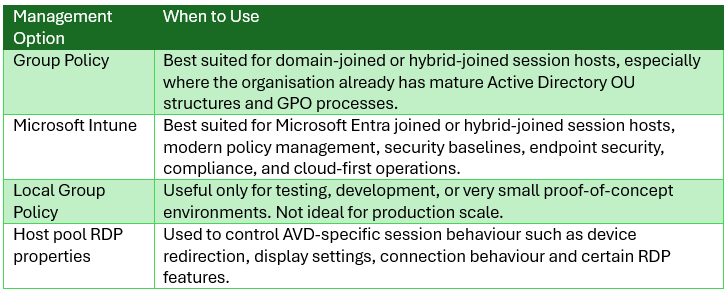
Microsoft’s FSLogix guidance states that Group Policy Objects are an ideal method for large-scale FSLogix configuration, especially where there is no existing automation. Local Group Policy is mainly suited to test or development because it doesn’t scale well.
A practical design rule is:
Use Intune where possible for modern cloud management, endpoint security and compliance. Use Group Policy where the session hosts are domain-joined or hybrid-joined and the organisation already depends on Active Directory policy management. Avoid mixing both for the same settings unless there is a clear ownership model.
Policy conflict is a real design risk. If the same setting is configured in Intune, Group Policy, host pool RDP properties and security baselines, troubleshooting becomes painful very quickly. Microsoft’s Intune endpoint security guidance also warns to avoid configuring the same settings in multiple places because this can create policy conflicts.
In my experience, I've had successes and failures with both GPO's and Intune managing the policies, It really depends on the expertise within an organisation and how and who will be managing these policies moving forward.
Reliability, Backup and DR
AVD architecture should include reliability and recovery planning from the start.
This means designing for:
- Host pool availability
- Profile storage availability
- Image recovery
- Regional failure scenarios
- Backup of supporting services
- Recovery of application dependencies
- Disaster recovery sequencing
- Testing and validation
AVD business continuity planning should consider the customer-managed data plane resources, including host pools and storage, and Microsoft’s guidance discusses active-active and active-passive BCDR patterns for host pools.
…and finally
AVD architecture isn’t just about deciding which VM size to use. It's about designing a complete end-user computing platform.
The best AVD designs are built around the way people work, the applications they depend on, the data they need, the risks the business must manage, and the operational model that will support the platform after go-live.
A strong architecture makes deployment easier.
A weak architecture makes every later phase harder.
In the next part of this series, I’ll look at identity and authentication, an important foundations of a secure and reliable AVD deployment and will touch upon new capabilities for each.