
AVD Application and Profile Strategy: Where User Experience Is Won or Lost
A good AVD environment isn’t just a collection of session hosts. It’s an end-user compute platform. That means applications, profiles, storage, policy, performance, and user experience all need to be designed together.
Why Application and Profile Strategy Matters
Applications and profiles sit right in the middle of the user experience.
They affect:
- Logon times
- Application launch times
- Session performance
- Profile reliability
- Storage cost
- Image management
- Support effort
- Change control
- User acceptance
Poor decisions in this area can quickly turn a technically successful deployment into a frustrating experience for users.
The classic example is treating AVD like a traditional desktop build and installing everything into one large image.
That might feel simple at first, but it can create problems later:
- Images become bloated.
- Updates become harder.
- Testing takes longer.
- Different user groups receive apps they don’t need.
- Application conflicts become harder to isolate.
- Rollback becomes more complicated.
- Session hosts become less consistent over time.
The same applies to profiles. FSLogix is often the right answer for AVD, but FSLogix still needs a proper design. Storage location, performance, sizing, exclusions, cache behaviour, permissions, and operational monitoring all matter.
A profile strategy isn’t just “turn FSLogix on.”
It’s deciding how the user state will follow the user, how it will perform, how it will be protected, and how it will be kept under control.
Start with Application Discovery
Before deciding how applications should be delivered, you need to understand the application estate. This should build directly from the discovery phase covered earlier in the series.
This is where assumptions get dangerous. An application might install perfectly into an image but fail when multiple users run it on the same session host.
Another application might work well as a full desktop app but behave poorly as a RemoteApp.
Another might technically run in AVD but rely on local profile paths, hardcoded drive mappings, or outdated authentication methods.
Application strategy should be based on evidence, not guesswork.
Application Delivery Options
There is no single delivery model that works for every application. A good AVD design normally uses a combination of approaches.
The main options are:
- Install applications into the base image
- Publish applications using RemoteApp
- Package applications separately
- Use App Attach where appropriate
- Use specialist third-party application layering or packaging tools if needed
The right choice depends on the application, the user persona, operational model, update frequency, and performance requirements.
Option 1: Install Applications into the Base Image
Installing applications directly into the base image is often the simplest and most familiar approach.
This works well for:
- Core applications used by nearly all users
- Security tools
- Monitoring agents
- Microsoft 365 Apps
- Common browsers
- VPN or connectivity agents, where appropriate
- Print components or universal drivers
- Applications that don’t package well
- Applications with services, drivers, or deep OS integration
Every session host built from that image has the same baseline configuration. This makes troubleshooting easier and avoids dependency issues where an application expects certain files, services, or registry entries to exist locally.
However, this model has risks.
If too many applications are installed into the base image, the image becomes harder to manage. Updates take longer. Testing becomes more complex. More applications means more patching, more potential conflicts, and more reasons to rebuild or redeploy the image.
A useful rule is this:
Core applications belong in the image. Persona-specific applications should be questioned before being added. The base image should be stable, controlled, and as lean as possible.
Option 2: Deliver Applications through RemoteApp
RemoteApp allows users to access individual published applications rather than a full desktop.
This can be useful when the user doesn’t need a complete desktop experience.
Good RemoteApp candidates include:
- Line-of-business applications
- Finance or HR systems
- Admin tools
- Specific operational applications
- Legacy applications that need to remain centralised
- Applications used by third-party or external users
- Applications that need controlled access without exposing a full desktop
RemoteApp can simplify the user experience because users only see the applications they need. It can also reduce the support overhead of managing a full desktop environment for users who only need one or two applications.
However, RemoteApp needs testing. Some applications assume they are running inside a full desktop. Others may launch child processes, open file explorer windows, call local components, or rely on shell integration. These behaviours can be awkward in a RemoteApp model.
RemoteApp also requires careful thought around file access, printing, clipboard behaviour, browser hand-off, and authentication prompts.
The design question isn’t just “can we publish this as RemoteApp?”
The better question is: Will the user experience still make sense when this application is separated from the full desktop?
Option 3: Package Applications Separately
Separately packaged applications help reduce image complexity.
This approach can be useful for:
- Applications used by specific departments
- Applications with frequent update cycles
- Applications that need version control
- Applications that should be tested independently
- Applications that should not be installed for every user
- Applications that may need rollback
Packaging can improve operational flexibility, but only when the packaging process is mature.
A weak packaging process can create just as many problems as a bloated image.
The packaging strategy should define:
- Packaging standards
- Ownership
- Testing process
- Version control
- Rollback approach
- Naming conventions
- Security review
- Dependency handling
- Update cadence
- Approval process
This is especially important in MSP or enterprise environments where multiple teams may be involved.
- The application owner understands the business use.
- The EUC or AVD team understands the platform.
- The security team understands control requirements.
- The packaging team understands install behaviour.
- The service desk understands the support impact.
All of those views matter.
Option 4: Use App Attach Where Appropriate
App Attach is designed to dynamically deliver applications to AVD user sessions without permanently installing those applications into the session host image.
This can reduce image management overhead and provide more flexibility around which users receive which applications.
It’s particularly useful where:
- Different user groups need different application sets
- You want to reduce the number of custom images
- Applications need to be updated without rebuilding the base image
- Multiple host pools can use the same application package
- Application assignment needs to be controlled by user or group
- You want cleaner separation between OS, applications, and user data
App Attach isn’t a magic wand, though. It still needs proper design and you need to consider:
- Whether the application is suitable for packaging
- Where the application images will be stored
- Storage performance
- Network latency
- Permissions
- Certificate trust
- User assignment
- Versioning
- Rollback
- Monitoring
- Testing at scale
The key point is that App Attach should be used where it improves manageability and user experience. It should not be used simply because it’s available. You also need to account for the additional requirements of App Attach such as the packaging VM and the certificates.
App Attach in Azure Virtual Desktop - Azure Virtual Desktop | Microsoft Learn
For many environments, the best answer will be a hybrid model:
- Core apps in the image
- Departmental apps delivered dynamically
- Specialist apps packaged separately
- Some apps published through RemoteApp
- Complex or legacy apps handled individually
That kind of model is more realistic than trying to force every application into one delivery method.
Building an Application Packaging Strategy
The output from this phase should include a clear application packaging strategy.
This should define how applications will be grouped and delivered.
A simple model might look like this:
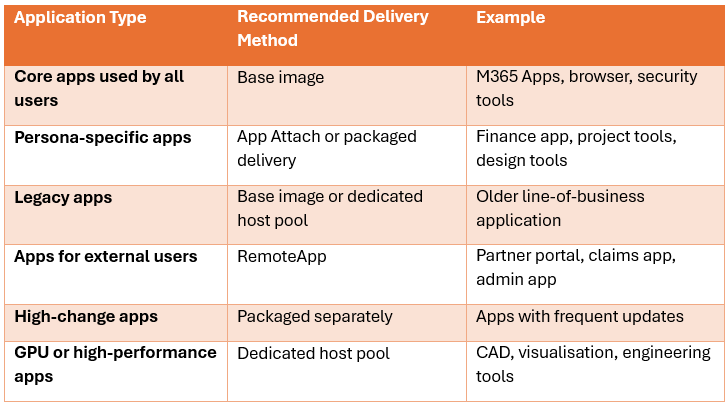
This matrix helps avoid random application decisions.
It also helps pre-sales, architecture, delivery, and support teams explain the logic to the customer.
The goal isn’t just to install applications. The goal is to create a repeatable application delivery model.
Profile Strategy: FSLogix as a Core Design Component
For most AVD deployments, FSLogix profile containers are the standard approach for managing user profiles.
FSLogix stores the user profile in a container that is attached when the user signs in. To the operating system, it appears like a local profile, but the profile can roam with the user across session hosts.
This is especially important in pooled host pools where users may not return to the same session host every time. Without a proper profile strategy, pooled desktops can quickly become inconsistent and frustrating.
Users expect their settings, Outlook cache, Teams configuration, OneDrive data, browser favourites, application preferences, and desktop experience to follow them.
FSLogix helps deliver that experience, but the design still needs care.
Profile Containers and Office Containers
FSLogix can be used for profile containers and Office containers.
A profile container captures the user profile more broadly.
An Office container focuses specifically on Microsoft 365 application data such as Outlook cache and Office-related user data.
In many modern AVD designs, a full profile container is commonly used because it captures the overall user state in a consistent way. Office container decisions depend on the wider design, legacy requirements, and whether separation is needed.
The important point is to make a deliberate decision, don’t just enable settings because they appeared in an old build guide.
The profile design should define:
- Whether full profile containers are used
- Whether Office containers are required separately
- What data should roam
- What data should be excluded
- How Microsoft 365 cache data is handled
- How OneDrive is configured
- How Teams data is managed
- How browser cache is controlled
- How profile growth is monitored
Profile Storage Location
Profile storage has a direct impact on logon speed and session performance.
The main storage options are:
- Azure Files
- Azure NetApp Files
- Traditional file servers
Each option has a place.
Azure Files
Azure Files is commonly used for AVD profile workloads because it provides managed SMB file shares in Azure.
It’s often a strong fit where the customer wants:
- A managed Azure-native file service
- SMB access
- Integration with identity-based access
- Reduced operational overhead
- A straightforward design for FSLogix profiles
- A scalable storage platform for general AVD workloads
Azure Files can work well for many AVD environments, but it still needs sizing and performance planning.
You need to consider:
- Number of concurrent users
- Expected profile size
- IOPS requirements
- Throughput requirements
- Storage tier
- Authentication model
- Private endpoint requirements
- Backup requirements
- Regional placement
- Monitoring
- Cost
The storage account should usually be located close to the session hosts to reduce latency. Putting profiles in a different region from the host pool is a quick way to create a poor user experience.
Azure Files is managed but isn’t something to configure blindly. The workload still needs to be tested.
Azure NetApp Files
Azure NetApp Files is often considered for larger, more demanding, or performance-sensitive AVD environments.
It may be suitable where:
- There are high numbers of concurrent users
- Profile performance requirements are strict
- The organisation already uses NetApp technology
- Very low latency is required
- Large-scale enterprise file services are needed
- The customer needs advanced capacity and performance options
Azure NetApp Files can provide excellent performance, but it also requires careful planning around cost, capacity pools, service levels, regional availability, networking, and operational ownership.
It should be selected because the workload needs it, not because it sounds more enterprise.
Traditional File Servers
Traditional file servers may still be used in some environments.
This might be appropriate where:
- The customer has existing file server investment
- The AVD environment is closely integrated with on-premises services
- The organisation has existing backup, monitoring, and operational processes
- There are application dependencies on existing SMB paths
- A migration to Azure-native storage isn’t yet practical
However, traditional file servers introduce more responsibility.
You need to consider:
- Availability
- Patching
- Backup
- DR
- Capacity
- Performance
- Network latency
- Authentication
- Monitoring
- Support ownership
If the file server sits on-premises and AVD runs in Azure, latency must be taken seriously. Profiles are chatty. Poor latency between the session hosts and profile storage can cause slow logons, poor application performance, and general user frustration.
Profile Sizing
Profile sizing should be based on real user behaviour, not assumptions.
During discovery, review:
- Existing profile sizes
- Outlook cache size
- OneDrive usage
- Teams data
- Browser cache
- Downloads folder behaviour
- Desktop storage habits
- Application data locations
- Roaming requirements
- Persona differences
Different user groups can have very different profile patterns.
A task worker using a small number of web apps will not have the same profile requirements as a knowledge worker with large Outlook caches and heavy OneDrive usage.
A developer, finance user, or design user may have even more specialised requirements.
The profile design should include:
- Expected average profile size
- Expected maximum profile size
- Growth assumptions
- Storage capacity buffer
- Alerting thresholds
- Remediation process for oversized profiles
- Policy for redirected or excluded folders
Profiles will grow unless they are managed.
That isn’t a theory. That is desktop gravity.
Exclusions
FSLogix exclusions help prevent unnecessary or problematic data from being captured in the profile container.
Common candidates for review include:
- Temporary files
- Browser cache
- Teams cache, depending on current guidance and client version
- Application logs
- Crash dumps
- Downloaded installers
- Large transient application data
- Data that should live in OneDrive, SharePoint, or a file share instead
Exclusions should be tested carefully. Over-excluding can break application settings or create a poor user experience. Under-excluding can lead to bloated profiles, slow logons, and increased storage consumption.
The right answer is usually persona-specific and application-specific. A good design includes a controlled exclusions baseline and a process for reviewing it over time.
This is where a lot of Citrix admins moving to AVD can get things wrong. They look at the Redirections XML file in the same way they looked at Citrix exclusions, mirrors and syncs. FSLogix simplifies the exclusions so you don’t need to have the exact same setup as UPM profiles used to have.
Custom profile redirections.xml - FSLogix | Microsoft Learn
Slow Logons
Slow logons are one of the most visible AVD problems.
Common causes include:
- Large profiles
- Poor profile storage performance
- Too many logon scripts
- Excessive group policies
- Application registration delays
- Slow authentication to storage
- Network latency
- Profile container issues
- Too many applications attaching at sign-in
Slow logons damage confidence quickly.
Users may tolerate a slower app once they are working. They are far less forgiving when the desktop takes too long to appear every morning.
Bloated Profiles
Bloated profiles increase storage cost and reduce performance. They also make support harder. Profile bloat is often caused by:
- Outlook cache
- Teams data
- Browser cache
- Downloads folder usage
- Application temp data
- Logs
- Poorly behaved applications
- Lack of exclusions
- No profile maintenance process
Profile size should be monitored from the start. Don’t wait until the file share is nearly full before thinking about profile growth.
Poor Storage Performance
Storage performance can make or break the AVD experience. FSLogix profiles rely heavily on the storage layer. If storage is slow, users feel it.
Poor storage performance can show up as:
- Slow logons
- Slow Outlook launch
- Delayed application settings
- Freezing sessions
- Profile corruption symptoms
- Intermittent user complaints
- Inconsistent performance between users
The profile storage performance plan should include capacity, IOPS, throughput, latency, monitoring, alerting, and testing.
Inconsistent Application Settings
Inconsistent application settings are often caused by poor profile design, application packaging issues, or settings being stored outside the expected profile paths.
This is why application testing and profile testing must happen together.
It’s not enough to confirm that an application launches.
Testing should confirm:
- Settings persist after sign-out
- User preferences roam correctly
- Licensing state behaves correctly
- Recent files work as expected
- Add-ins remain available
- Authentication prompts don’t repeat unnecessarily
- Application data doesn’t unnecessarily inflate the profile
Application compatibility testing should always include profile behaviour. This testing should be mapped to user personas, not just applications.
An application may work for one group and fail for another because of permissions, data access, add-ins, or workflow differences.
…And finally
Application and profile strategy should not be treated as a deployment afterthought.
It’s one of the most important parts of an AVD design.
The right strategy can reduce image complexity, improve user experience, simplify support, and make the platform easier to operate.
The wrong strategy can create slow logons, bloated profiles, inconsistent applications, and a support queue that nobody wants to own.
Application and profile strategy is where architecture meets reality.
Design it properly, test it properly, and operate it properly.